

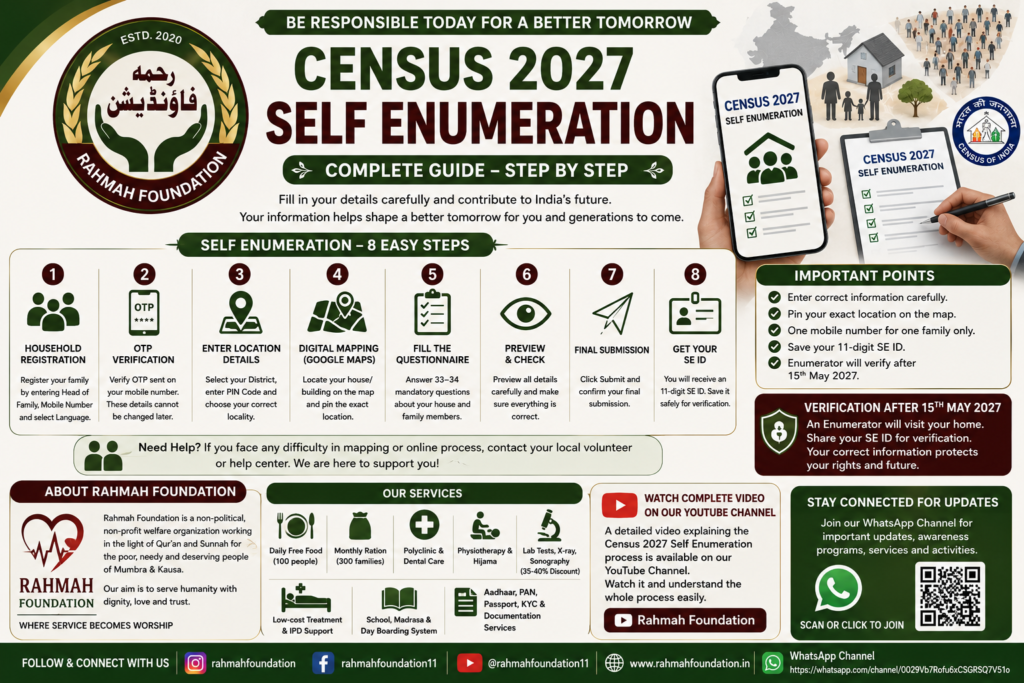
As India moves towards Census 2027, the Government has introduced the Self Enumeration process to make data collection easier, faster, and more accurate for citizens. This process allows families to fill in their census details online from their homes before the official field verification takes place.
For many people, especially in local communities, the online process may appear confusing at first. Questions like How do we register?, What details are required?, How does the mapping system work?, and What is the importance of the SE ID? are common concerns.
This detailed guide is designed to help you understand the complete Self Enumeration process in a simple and practical way so that you can complete your registration correctly without confusion.
What is Census 2027 Self Enumeration?
The first phase of Census 2027 focuses on House Listing and Household Data Collection. During this stage, citizens can submit their family information digitally through the official census portal.
The data collected becomes an important part of national population records and official government documentation processes. Therefore, it is extremely important to enter every detail carefully and correctly.
Step 1 — Household Registration
The process begins by visiting the official Census Self Enumeration portal.
At the time of registration, you will need to finalize three very important details:
• Head of the Family
You must decide who will be registered as the Head of the Family.
This can be a male or female member of the household.
• Mobile Number
A valid 10-digit mobile number is required for registration.
One important point to remember:
- One mobile number can only be used for one family registration.
- The same number cannot be reused for multiple households.
• Language Selection
You will also be asked to select your preferred language for the process.
Many people prefer selecting Urdu so that family members can understand the process more comfortably and preserve their cultural identity.
Step 2 — OTP Verification
After entering the mobile number, an OTP (One Time Password) will be sent for verification.
Once the OTP is verified:
- The Head of the Family
- Mobile Number
- Selected Language
will become permanently locked and cannot be edited later.
That is why every detail should be checked carefully before OTP verification.
Step 3 — Entering Location Details
In the next section, geographical information needs to be entered.
You will be required to:
- Select your District
- Enter your PIN Code
- Choose the correct locality/town/village shown in the system
After entering the PIN code, the portal automatically displays nearby locations linked to that area.
Selecting the correct locality is extremely important because all future verification depends on accurate address details.
Step 4 — Digital Mapping Through Google Maps
One of the most important parts of the process is Digital Mapping.
A map interface similar to Google Maps will appear on the screen.
You must:
- Locate your exact house, building, or shop
- Drag the pin carefully
- Mark the correct location
This step should be completed very carefully.
If a person owns:
- Multiple houses
- Shops
- Separate properties
then each property must be mapped individually.
Even temporary or small structures are considered part of the census if they are being used for residence or business purposes.
Step 5 — Filling the Census Questionnaire
After mapping, the system asks approximately 33–34 mandatory questions related to your household.
These questions include:
- Type of house (Katcha/Pukka)
- Kitchen availability
- Bathroom facility
- Number of family members
- Educational and personal details
One important definition explained during the process is the meaning of Family.
A family is identified through a common kitchen system.
For example:
If two brothers live in the same building but maintain separate kitchens and separate entrances, they will be counted as two different families.
This point is very important during registration.
Step 6 — Preview and Final Submission
Before final submission, the portal provides a Preview Section where all entered information can be reviewed.
At this stage:
- Read every detail carefully
- Check names, addresses, and mapping properly
- Correct any mistakes immediately
Once satisfied:
- Click on Submit
- Confirm the submission request
After final confirmation, the data becomes officially registered.
Step 7 — Save Your SE ID Carefully
After successful submission, the system generates an 11-digit Self Enumeration ID (SE ID).
This ID is extremely important.
You should:
- Take a screenshot
- Save it safely
- Print it if possible
The SE ID is also sent to the registered mobile number and email address.
This number will later be required during field verification.
Step 8 — Enumerator Verification Visit
After the online process is completed, an official Enumerator may visit your home after the announced verification period.
During the visit:
- You will need to provide your 11-digit SE ID
- The official will verify your submitted information
- Physical verification will complete the process
This final verification ensures the authenticity of the data submitted online.
Important Advice for Families
Many families may find:
- Digital mapping
- Online forms
- Technical verification
difficult to understand.
In such situations, it is recommended to seek help from trusted volunteers, local support centers, or knowledgeable community members to avoid mistakes during registration.
Entering incorrect information or selecting the wrong mapping location may create complications in future documentation and verification processes.
How Rahmah Foundation Helps the Community
🌿 Rahmah Foundation is a non-political and non-profit welfare organization serving the people of Mumbra and Kausa in the light of Qur’an and Sunnah.
The foundation works for poor, needy, and deserving families without discrimination and aims to serve humanity with dignity, compassion, and trust.
Apart from welfare and healthcare services, Rahmah Foundation also helps people with:
- Documentation Support
- Aadhaar & PAN Assistance
- Passport & KYC Services
- Online Form Guidance
- Educational & Welfare Support
During important public processes like Census Self Enumeration, Rahmah Foundation also guides families so they can complete their registration properly and avoid confusion.
Watch Complete Video Explanation on YouTube
📺 A complete detailed video explaining the entire Census 2027 Self Enumeration Process step-by-step is also available on our YouTube channel.
You can watch the full video for practical guidance and better understanding of:
- Registration
- Mapping
- Form filling
- SE ID process
- Verification steps
▶️ Rahmah Foundation YouTube Channel
Stay Connected With Rahmah Foundation
📲 Join our official WhatsApp Channel for updates about:
- Public awareness programs
- Welfare activities
- Government documentation guidance
- Medical camps
- Educational support
🟢 Rahmah Foundation WhatsApp Channel
🌐 Official Website:
Rahmah Foundation Official Website
🤍 Rahmah Foundation — Where Service Becomes Worship.